Pharmaceutical Opinions
A pharmaceutical opinion can be started for a patient’s medication during a medication review in Patient Centre. Once complete, the pharmaceutical opinion will be available in the Nexxsys Workbench > Pending tab to be processed for billing.
To start a pharmaceutical opinion:
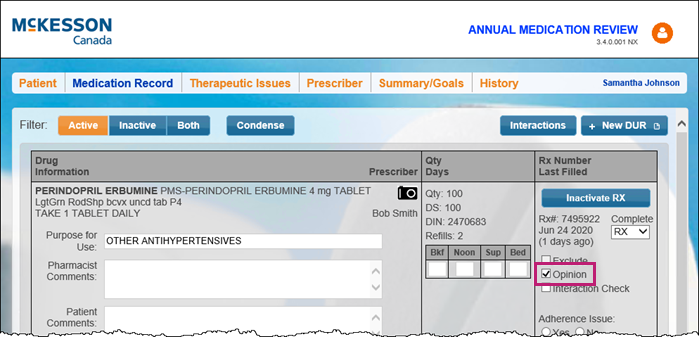
- In the medication review, select the Medication Record tab.
- Select the Opinion checkbox for the prescription that requires a pharmaceutical opinion.
- Select the Therapeutic Issues tab to complete the documentation.
Note: If a medication is flagged as an opinion, be sure to move to Therapeutic Issues tab immediately, before reviewing all other medications on the Medication Record tab. Once Save is selected, this opinion will write back to Nexxsys immediately, and any subsequent changes to the opinion Therapeutic Issues tab will NOT write back to Nexxsys. The opinion forms must be faxed or printed from Nexxsys to send to the physician. Forms cannot be faxed or printed from Patient Centre.
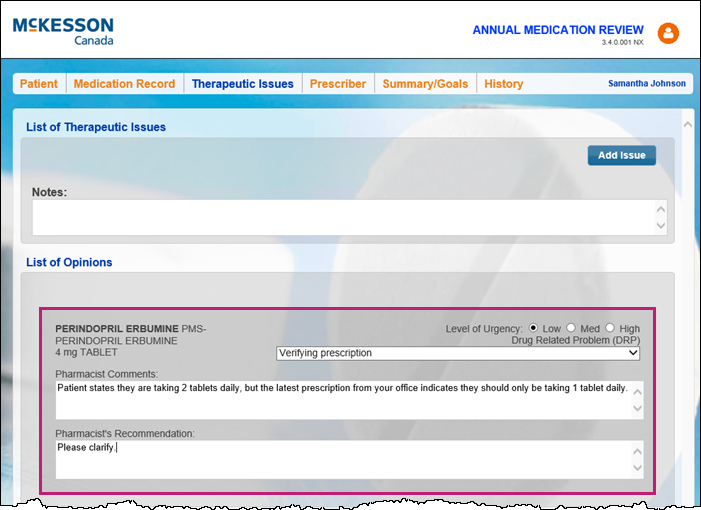
- Under the List of Opinions section, enter the following information:
- Level of Urgency
- Drug Related Problem (DRP)
- Pharmacist Comments
- Pharmacist Recommendations
- Select Save.

A pharmaceutical opinion is created in Nexxsys on the Workbench > Pending tab. For more information on pharmaceutical opinions, see Pharmaceutical Opinions.